
Corporate Spirit – Business Presentation
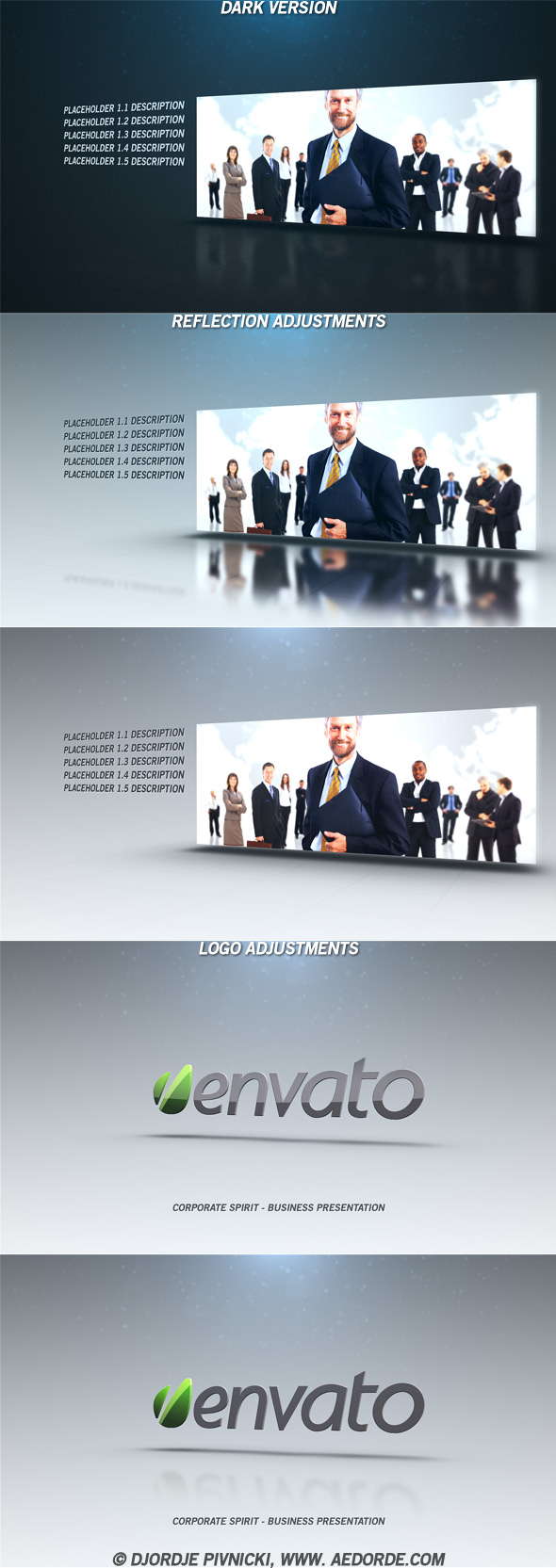
Corporate Spirit is an After Effects corporate presentation template for company profiles, agency portfolios and branded business videos. Combine photos or video clips with your logo and text to create a clean, professional introduction for a business, service or team.


Build a branded business presentation
Replace the included media with your images or video clips, edit the titles, add your logo and audio, then adjust the presentation using the project controls. You can fine-tune reflections, background color, the glossy logo effect and optical-flare color. The same project file can be extended beyond its 35 included placeholders.
Project details
- After Effects CS3 project, compatible with all newer versions.
- No plugins required.
- 35 media placeholders; duplicate the supplied file to add more.
- Full HD 1920×1080 composition at 29.97 fps; export at another resolution or frame rate if needed.
- Included help file explains the customization steps and render tips.
- Music: Give Our Dreams Their Wings To Fly by timmcmorris.
Quick customization workflow
- Add photos or video clips.
- Edit the text and add your logo.
- Add an audio track.
- Adjust reflections, background color, logo gloss and flare color as desired.
- Render with the resolution and frame rate that suit your project; see the help file for faster-render tips.
Watch the preview above to see how the finished corporate slideshow can look.
This project is available through the VideoHive/Envato marketplace.


Hello! Input stills, no problem. Input Videos, big problem. I expected the template to snap videos into timeline appropriately, but not working. Can’t seem to find the fix. Thanks for help.
Hi,
just move your videos more right on timeline in compositions in folder “_images or videos”. One of the best ways to make sure, which part of your video is shown on which time code in final composition is to add temporary layer with time code into compositions with videos, than check final composition and finally adjust video position on timeline in compositions in folder “_images or videos”.
If you want I can send you project with time codes, but please send me a message from my profile page http://videohive.net/user/dorde?ref=dorde and I’ll reply with project file.
Thanks.